Bringing Object-Oriented Thinking to PLC Programming
Key Highlights
- User-defined instructions (UDIs) let engineers write logic once and reuse it across many components, eliminating tedious copy-paste duplication.
- Any updates to a UDI definition automatically propagate to all instances, reducing the risk of outdated or mismatched logic going undetected.
- Nesting UDIs within UDIs allows complex systems like pump assemblies to be modeled in clean, layered building blocks that are easy to navigate and modify.
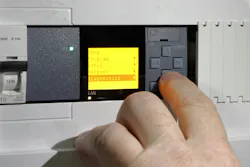
Since their debut in the 1960s, programmable logic controllers (PLCs) have become the backbone of industrial automation operational technology (OT) systems, providing rugged, real-time control for all kinds of applications. PLCs have traditionally been programmed using ladder logic, a graphical programming language designed to resemble electrical ladder diagrams, allowing electricians and engineers to read and modify control programs without extensive software training.
Ladder logic is easy to use and reasonably efficient for programming simple applications, but complex programs with multiple subsystems tend to become unwieldy to navigate and maintain, and duplicate logic tends to proliferate.
The information technology (IT) industry encountered similar problems when programming complex software applications, and many of the solutions developed by IT to address this can be applied to PLC applications as well. Specifically, object-oriented programming (OOP) helps manage complexity and promotes the reuse of logic without duplication. OOP speeds development, improves maintainability and reduces the risk of programming errors.
Understanding OOP
PLC programs often contain multiple sections with similar or identical logic behavior and data structures. For example, a functional section replicated many times could be for use on low-level devices like control valves or digital sensors, or larger modules like HVAC units or pump assemblies.
The most basic approach to programming these components is to copy-paste the shared logic for each component, substituting tags as needed. This is straightforward for smaller programs, but in large applications with many components, the result is likely to be a sprawling program that is cumbersome to navigate, time-consuming to modify and prone to subtle errors.
OOP takes a more sophisticated approach. In OOP, logically related data and functionality are structured as cohesive and easily reusable “objects.” Terminology varies, but every main “parent” object is typically instantiated many times as “child” objects that derive their data structure and functionality from a definition that is shared with every other object of the same type.
Programs that separate logic into appropriate levels of abstraction require less mental effort to understand and modify, enabling developers to work more efficiently with a lower risk of making errors, especially in complex programs with multiple subsystems.
In PLC programs, logical objects typically correspond to the different types of industrial components such as control valves and sensors. Usually, there are management provisions so that if a parent object definition is modified, it can be deployed throughout the child objects as needed, eliminating the need to manually update every individual instance.
Various PLC manufacturers have offered some form of OOP support for years, but new tools and improvements continue to make OOP more accessible across the industrial automation industry.
Implementing OOP through UDIs
Typical PLCs natively incorporate built-in data types such as bits, integers, floating point numbers and ASCII text. The AutomationDirect Productivity PLC platform, for example, has provisions in its Productivity Suite software for developers to create user-defined structure (UDS) data so they can combine built-in data types into useful structures.
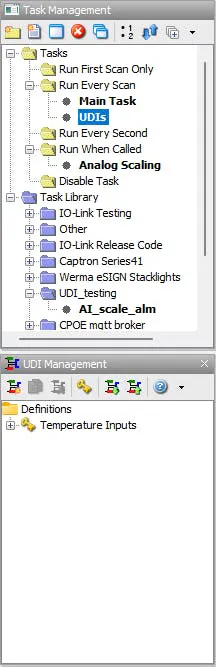
This programming software recently incorporated additional support for OOP in the form of user-defined instructions (UDIs) (see Figure 1). UDIs are custom blocks of logic that can be easily reused throughout a project, with each instance having its own internal memory and input/output tag assignments. Engineers can use these modular, self-contained blocks to build complex programs with minimal logic duplication and improved maintainability.
UDIs can make programs easier to read by encapsulating lower-level details inside unified instruction blocks with clear inputs and outputs.
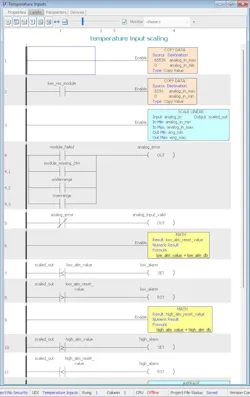
UDI instances appear as compact instruction blocks and can be used on any rung throughout the program, just like built-in instructions. For example, a UDI representing a temperature sensor could take an analog value from the sensor as an input parameter and provide a scaled value as an output parameter.
The UDI definition would contain the mathematical logic used to produce the scaled value from the analog input. The UDI could also check for device errors and abnormal temperatures, triggering alarm outputs as appropriate (see Figure 2). This could be used in conjunction with a UDS so that one data element contains all of these related sub-elements.
How UDIs improve PLC programming
The benefits of UDSs and UDIs become readily apparent when working with multiple instances, because the underlying data structure and logical functionality only need to be defined once. Any subsequent modifications to the definition can be applied to all instances.
Developers working on multiple projects appreciate that UDIs can also be imported/exported for easy reuse of proven code in entirely different projects.
With UDSs and UDIs, developers do not need to resort to tedious copy-pasting after every modification. This not only saves time, it also reduces the risk of errors associated with duplicated logic. For example, in a large program, it may not always be easy to keep track of which logic is duplicated, and to reliably locate every duplication when a change is needed. If a duplication is overlooked, it will continue using outdated logic, without the developers and operators becoming aware of it until an unexpected behavior is noticed.
UDI instances appear as compact instruction blocks and can be used on any rung throughout the program, just like built-in instructions.
Another potential source of errors arises from the need to correctly substitute all relevant tags after each duplication. For example, suppose two temperature sensors, A and B, rely on identical logic to trigger an alarm when the temperature exceeds a setpoint. After duplicating sensor A’s logic as the basis for sensor B, the programmer needs to replace every tag that references sensor A with the corresponding tag for sensor B. These would likely include the reported temperature, the alarm setpoint and the alarm trigger tags at minimum. Any missed tags will result in unpredictable errors that may be difficult to pinpoint in large programs.
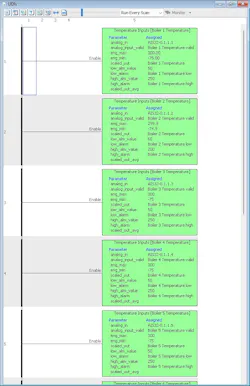
Aside from reducing duplicated logic, UDIs can make programs easier to read by encapsulating lower-level details inside unified instruction blocks with clear inputs and outputs (see Figure 3). This creates a level of abstraction that permits developers to treat each UDI instance as a simple interface, free from concern about the precise internal logic and data. Programs that separate logic into appropriate levels of abstraction require less mental effort to understand and modify, enabling developers to work more efficiently with a lower risk of making errors, especially in complex programs with multiple subsystems.
Protecting implementation details can be taken a step further by enabling UDI password security. This allows developers to restrict unwanted access and modifications to the UDI definition and is especially useful for original equipment manufacturers with proprietary code.
Modeling complex systems with nested UDIs
Nesting low-level UDIs inside higher-level UDIs can be an effective strategy for managing complex, multi-level systems. Common logic for valves, motors and sensors can be packaged into individual UDIs, which can then be used as the building blocks for creating mid-level systems. Those systems can likewise be turned into UDIs for use in even higher-level logic (see Figure 4).
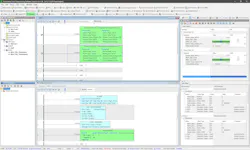
For example, in the oil and gas industry, a pump assembly often includes a suction valve, a discharge valve, a motor and several sensors for monitoring process variables such as temperature, pressure and flow. The low-level logic for each of these components can be represented by a distinct, low-level UDI. Instances of these UDIs can then be used to create a higher-level UDI representing the pump assembly. At the next level up, several pump assembly UDIs, along with additional valve and sensor UDIs, can be combined to create a tank system UDI for use in even higher-level systems.
Packaging each component into distinct, self-contained UDIs keeps the ladder diagram manageable even at the highest level, because each subsystem appears as a single instruction with clear inputs and outputs. Should the need arise, users can dive into greater detail as needed.
As an example, Productivity Suite supports up to four levels of UDI nesting. This implementation also allows users to make runtime transfers after editing a UDI, which is not always possible with some PLCs. One key limitation to consider is that certain more complex instructions — such as motion control — can’t be within a UDI, but this is typically not a concern.
More industrial software insights from Automation World:
About the Author
 Tim Ensminger
Tim Ensminger
Tim Ensminger is a product manager at AutomationDirect. During his two decade career, he worked primarily in the petroleum transportation industry designing and commissioning control and power systems for pipeline pump stations, tank farms and truck loading facilities. Tim has worked at AutomationDirect since 2021 supporting the Productivity Series PLC products. He holds a bachelor’s degree in Electrical Engineering from Bob Jones University and a master’s degree in Electrical Engineering from Clemson University.
 Leaders Logo
Leaders relevant to this article: