How Industrial Vision Systems Beat Dust, Heat and Vibration to Stay Sharp on the Factory Floor
Key Highlights
- Enclosures can work double duty in temperature extremes, trapping heat from the camera itself to stay warm in cold environments, or shielding sensors from hot tar, steam, and other industrial hazards.
- Mounting cameras away from vibrating machinery entirely is often more effective than any vibration-damping solution applied to the machine itself.
- Calibration isn't just about the camera: changing the lens, lighting or background after a calibration wizard setup means the entire system needs to be recalibrated from scratch.

AW: What types of protective camera housings and enclosures do you offer for harsh industrial environments?
JS: Our cameras have IP65 and IP67 ratings, which resist debris and dust. Additional protective housings and enclosures are needed for environments such as those in the pharmaceutical and food industries using chemicals and wash-down sprays.

AW: How do your vision systems handle temperature variations, and what operating-temperature ranges can your sensors reliably function within?
JS: The maximum operating temperature for the cameras we offer is 50°C, or 122°F. We don’t recommend using a vision sensor outside its stated operating range. If temperature is an issue, the manufacturer might be able to provide extra data on longevity and accuracy of a sensor operating outside its recommended range.
One way to deal with out-of-range temperatures is with enclosures. In cold environments typically used in food preparation and storage, for example, the heat generated by an enclosed sensor might be enough to keep the temperature within the recommended operating range. In hot environments, such as monitoring the production of rolls of roofing material, an enclosure might be able to protect a camera from the hot tar aggregate and steam.
AW: What vibration damping or isolation solutions do you provide to prevent measurement errors in high-vibration manufacturing environments, such as those containing stamping presses or other heavy machinery?
JS: Vibration is among the top enemies of a vision system designer. Even if a camera is isolated with a rubber block, it would still be very hard to predict what the effects of vibration would be.
In a perfect world, a camera would not be installed on a vibrating machine. Instead of mounting the camera to the machine’s frame or guarding, it can be mounted to the floor or a different structure. On cyclical machines, I’ve also timed image acquisition to the moment in the cycle where vibration is the least.
Unless you’re using a factory-calibrated vision sensor, there’s no off-the-shelf predictive maintenance automation built into most cameras.
AW: How do your systems compensate for ambient lighting that varies throughout a shift, and what lighting control or normalization technologies do you incorporate?
JS: Back in the early days of machine vision, the answer was to put a shroud over the part. You would see old machines covered in black panels to prevent light from infiltrating the inspection zone.
Today, bandpass filter technology is very good and can be used to control the wavelength of the light that a monochrome camera is seeing. You can use, say, a red light to illuminate the widget being inspected and put a red bandpass filter over the lens of the camera to block all but the dedicated red light from getting into the imager. Although red is a component of visible ambient light, there’s not enough of it compared to the intensity of the dedicated red light to make a difference to the camera. You can do this with lots of different wavelengths: blue, green, even infrared.
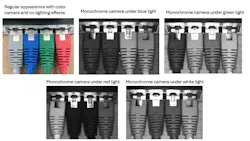
Another guideline is the phrase, “like colors light.” If, for example, you shine a red light onto a product with red writing on it, those letters will look white to a monochrome camera. Similarly, green lettering under a green light will appear white.
There’s an inverse reality, as well. If you use a green or blue light on red letters, those letters will now appear dark. So, there’s a bit of trial and error in determining the best color to use to illuminate your workpiece. Built-in illuminators on cameras like the IFM O2D series have integrated red, green, blue and white lights, a feature that lets you play around with light to see which provides you with the most contrast.
If you shine a red light onto a product with red writing on it, those letters will look white to a monochrome camera. Similarly, green lettering under a green light will appear white.
AW: What preventive maintenance schedules and procedures do you recommend for vision systems and do you provide remote monitoring capabilities to predict maintenance needs before failures occur?
JS: Unless you’re using a factory-calibrated vision sensor, there’s no off-the-shelf predictive maintenance automation built into most cameras. Some cameras that use IO-Link, however, can tell you if the camera has been jostled or bumped out of its original orientation. Or they can tell you if the temperatures have changed and are now outside of the recommended operating range.
For the most part, though, it’s up to the user to make sure that the camera is being maintained. Some users just blow off the lens cover with compressed air at the start of every shift in dusty environments, or they might put together an air nozzle across the camera lens and have a PLC operate it every once in a while. Some vendors offer mechanical technology that looks like a windshield wiper.
In a perfect world, a camera would not be installed on a vibrating machine. Instead of mounting the camera to the machine’s frame or guarding, it can be mounted to the floor or a different structure.
AW: What calibration procedures do you recommend for maintaining measurement accuracy over time?
JS: Our IFM and di-soric cameras have built-in calibration wizards. You basically print a grid, place it on your inspection service, and run through a series of image captures. The wizard helps identify markers on that calibration grid and relates the size of those markers to real world units. When people are using real world units, many will have a golden, go/no-go part. The operator will pass this golden part through the vision system at either the start or end of every shift to verify that the system is still calibrated. This is the most common type of calibration verification that I’ve encountered.
Of course, if you’re using a calibrated camera, it’s important to remember that more than just the camera itself affects the calibration. You have calibrated the whole system — the lens, the light and the background. If any of those things change, your system is no longer calibrated.
More vision system insights from Automation World:
About the Author
 James R. Koelsch, contributing writer
James R. Koelsch, contributing writer
Contributing Editor
 Leaders Logo
Leaders relevant to this article: